
Run
Satori can be executed in two environments:
- Remotely: run Satori on our cloud platform, which allows for scalable and centralized testing without the need for local resources.
- Locally: execute Satori on your local machine, providing flexibility for development and testing in a controlled environment.
Run Remotely
Run the playbook hello.yml remotely using Satori. The playbook is defined as follows:
test:
  assertStdoutEqual: "Hello world\n"
  assertReturnCode: 0

  execute:
    - echo Hello world
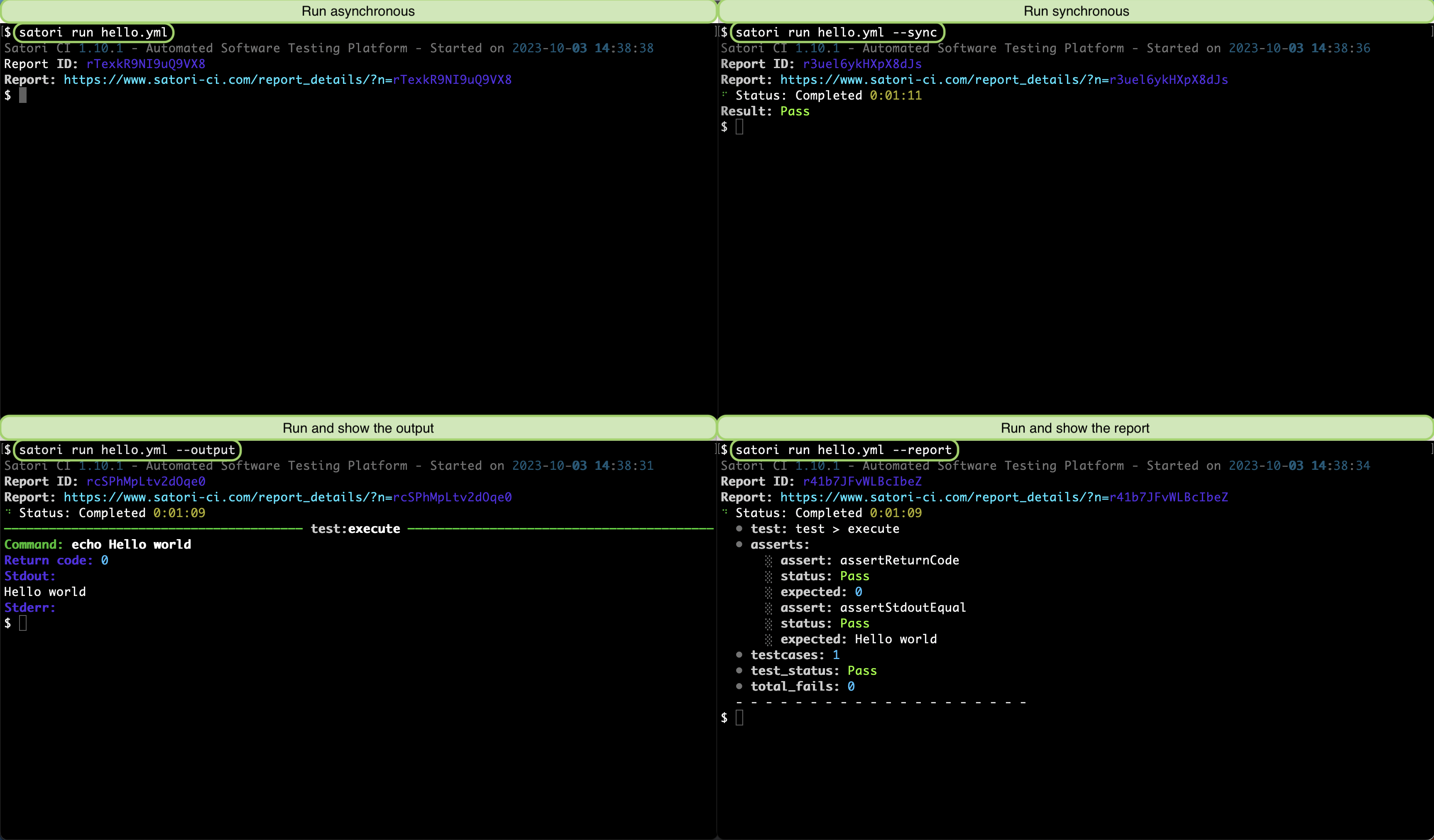
When executing this playbook, you have several options:
- Asynchronously (no parameters): run the playbook without any additional parameters.
- Synchronously with --sync: execute the playbook synchronously, displaying the status upon completion.
- Synchronously with --report: run the playbook synchronously and generate a report that summarizes the results when it finishes.
- Synchronously with --output: execute the playbook synchronously, showing the output in real-time as it completes.
In every case, the CLI prints Report ID: ID and Report: https://dashboard.satori.ci/reports/ID as soon as the execution exists, before a synchronous run finishes, so you can open the report while it is still running. With --json these lines are not printed.
Run Remotely with Parameters
When creating playbooks in Satori, you can include parameters that need to be defined at runtime. If you use a $ symbol in your playbook for a parameter that is not explicitly defined within the playbook, it will be treated as a required parameter when the playbook is executed.
For example, consider the following playbook named satori://test.yml, which echoes the parameter $:
test:
  assertStdoutContains: Hello World
  hello:
  - echo Hello World
  whatever:
  - echo ${{WHAT}}
To execute this playbook and provide the required parameter, you would run the command:
satori-v2 run params.yml -d WHAT="Hello World" --output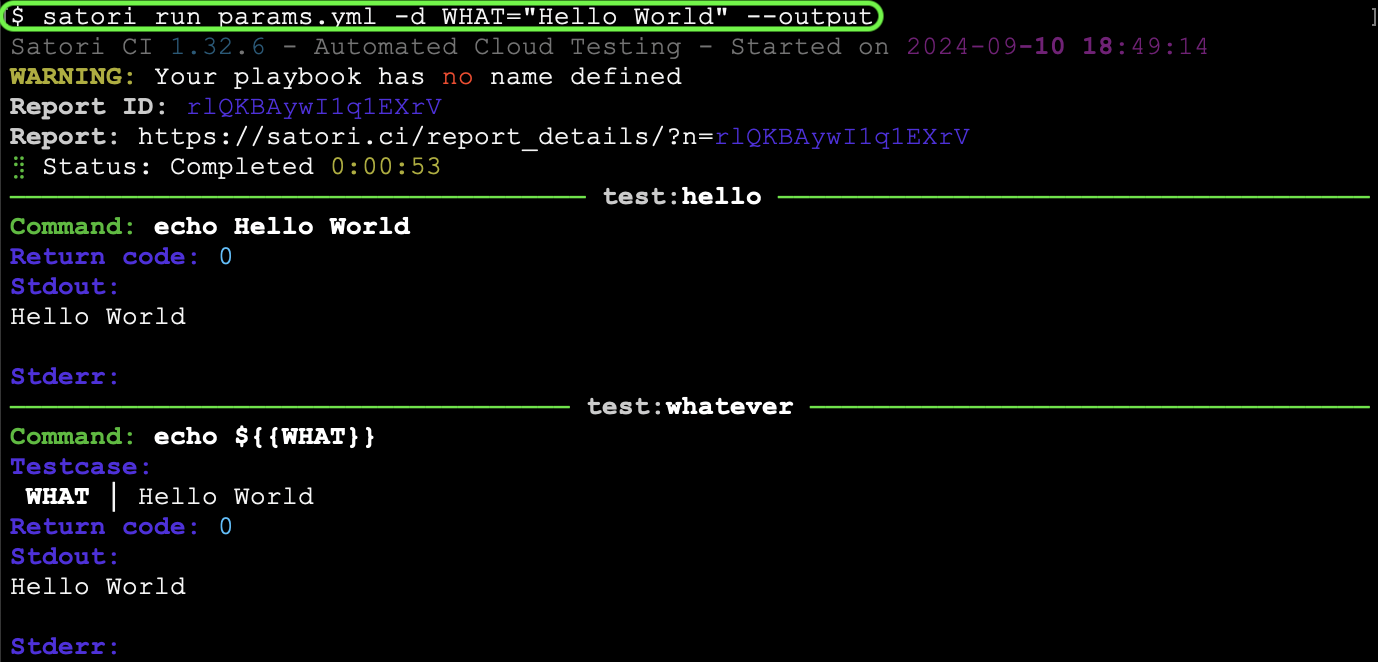
Local testing with Satori Playbooks
When working locally on a directory containing source code, you can save your playbook as .satori.yml within the directory. This approach is similar to how you would structure your repository when testing code through a CI pipeline.
Consider the following example files: main.c, a corresponding Makefile, and a playbook that verifies the expected behavior of your code.
- main.c:
#include <stdio.h>

int main() {
    printf("Hello World\n");
    return 0;
}- Makefile:
all: hello

hello: main.c
gcc -o hello main.c- .satori.yml:
install:
  updates:
    - apt update >> /dev/null
  dependencies:
    - apt install -qy make gcc >> /dev/null

tests:
  assertReturnCode: 0
  build:
    - make
  run:
    assertStdoutContains: "Hello World"
    hello:
      - ./hello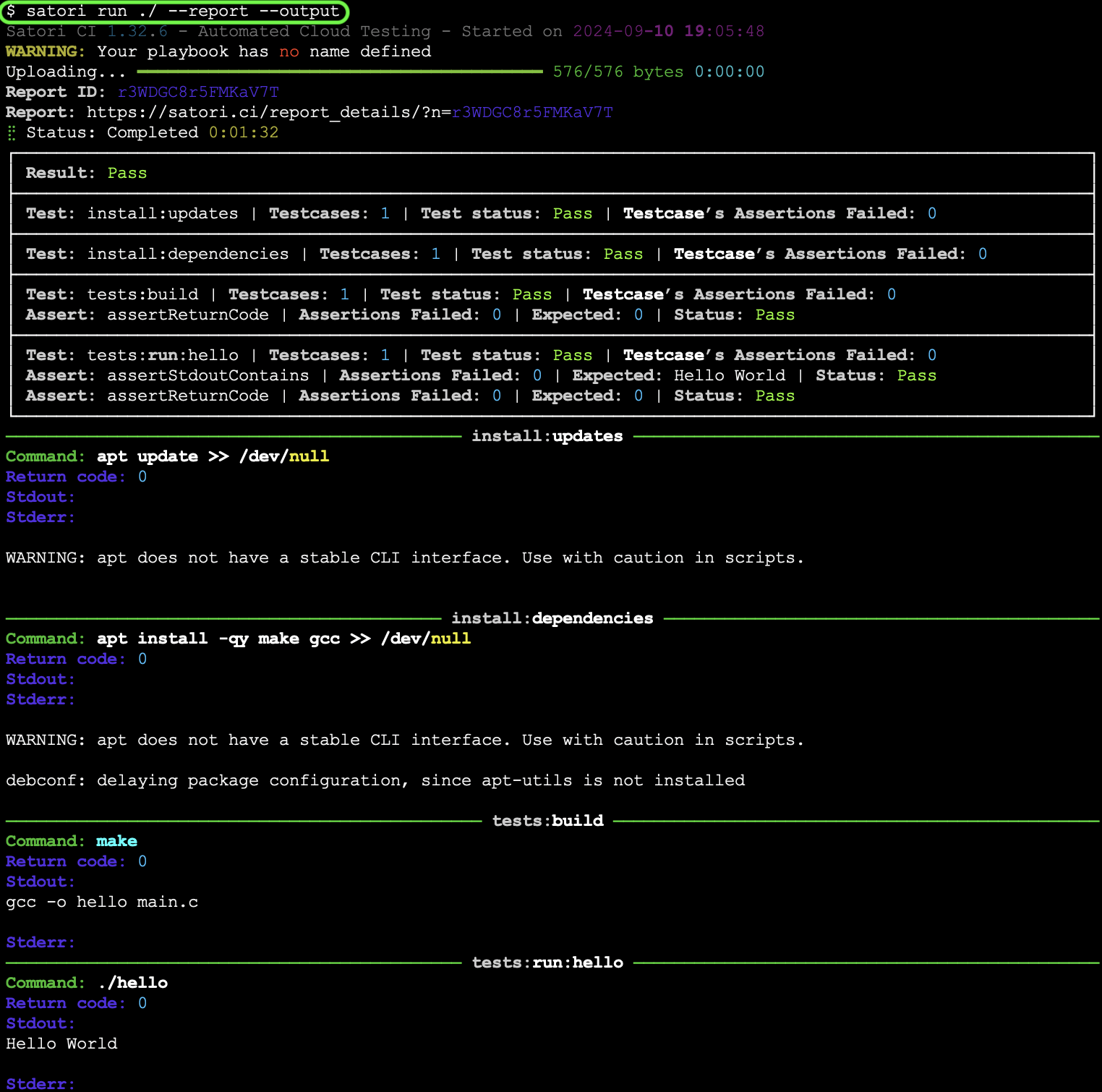
This same playbook can also be employed in CI/CD environments.
Run a public Playbook
You can execute on-demand public playbooks available in the Satori platform. You can see a list of the publicly available playbooks with:
On development
The --public flag of satori-v2 playbooks is not available yet in CLI v2. Use satori-v2 playbooks (optionally with --json) for now; the v1 syntax is kept here for reference.
satori-v2 playbooks --publicTo run a public playbook, you can execute them passing parameters if required with -d:
satori-v2 run satori://some/playbook.yml
This allows you to leverage existing public playbooks that may already address your specific testing needs effectively.
Playbook aliases
CLI v2 ships shortcuts for the most common code-analysis playbooks. Passing one of these aliases as the SOURCE runs the corresponding public playbook against the current directory:
satori-v2 run semgrep     # same as: satori-v2 run ./ --playbook satori://code/semgrep.yml
satori-v2 run pyspector   # same as: satori-v2 run ./ --playbook satori://code/python/pyspector_v2.yml
You can combine them with any other run option, for example satori-v2 run semgrep --report --output.
Run Locally
You can execute the playbook named hello.yml locally, just as you would run it remotely. This allows you to verify that your playbook functions correctly in your local environment, and Satori will confirm the assertion results. Here’s how you can run it locally:
satori-v2 local hello.yml --sync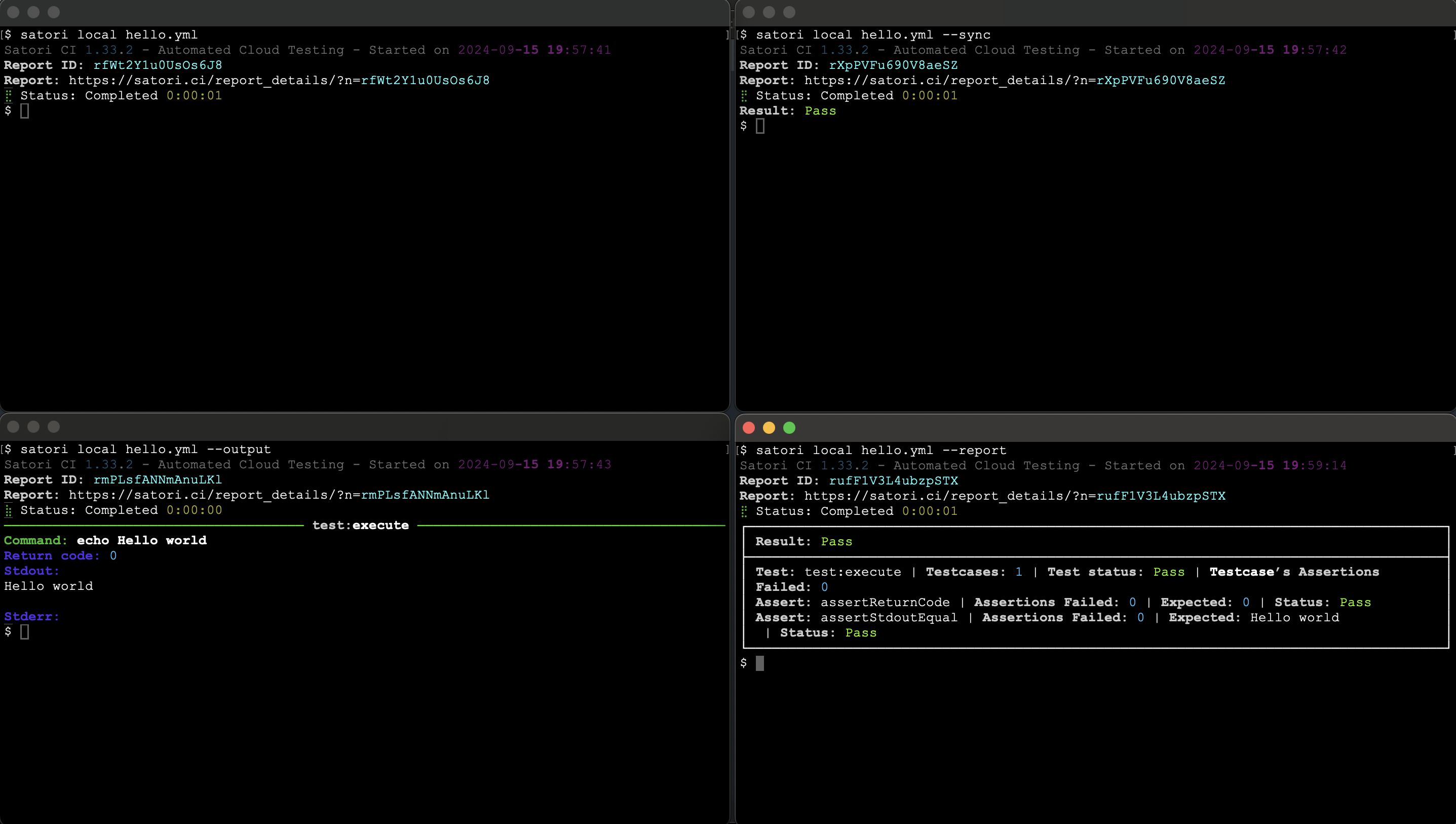
satori-v2 local accepts a subset of the run options: -p/--playbook, -d/--data, --split, -df/--data-file, --timeout, --run, --visibility, -t/--tag, -o/--output, --report, --issues, --repo, --verify, --min-severity and -s/--sync.
A local run is linked to a GitHub repository, so it gets that repository's saved parameters and its findings can open GitHub issues. Without --repo, the repository is the origin remote of the git checkout the commands run in: the directory you pass (satori-v2 local ./), or the current directory when you pass a playbook file. Only github.com remotes count; outside a checkout the run has no repository. --repo owner/repo sets it explicitly, and also clones that repository and runs the playbook in the clone.
On development
The local flags --test, --name, --format, --redacted, --save-report and --save-output are not available yet in CLI v2.
Run a process in Background
When running a service that needs to listen in the background, it's important to ensure that processes do not remain in the foreground, especially when using shell scripting techniques. The recommended approach is to utilize screen, which allows you to run processes in a detached session. Additionally, setting a timeout for the container helps manage its lifecycle effectively. For example:
settings:
  name: Background process
  timeout: 60

install:
- apt update >> /dev/null
- apt install -qy screen >> /dev/null

background:
  - screen -dm sleep 10

check:
  assertStdoutContains: "10"
  ps:
    - ps wuax | grep sleep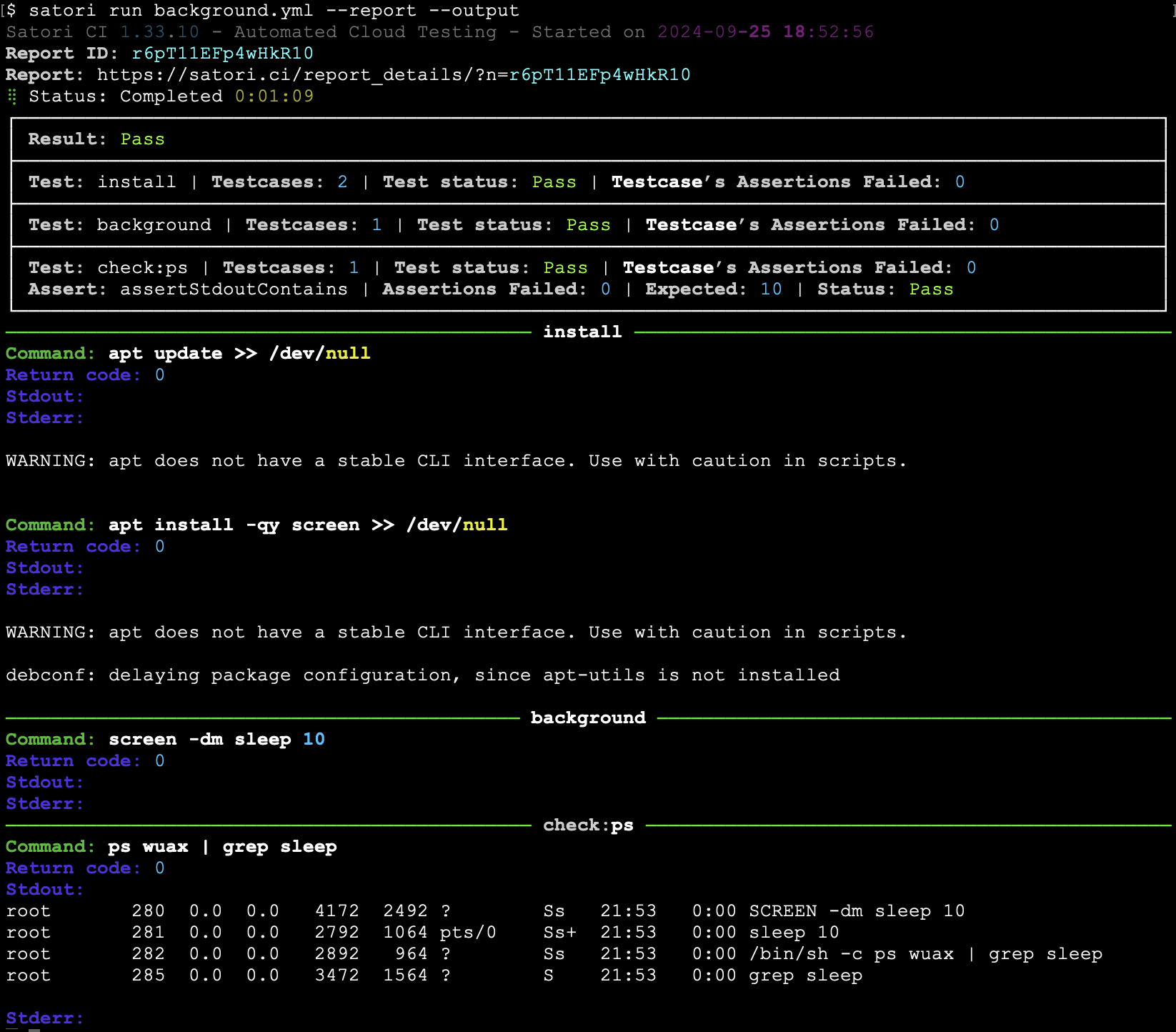
The command screen -dm is used to start a new detached screen session in the background. This is useful for running commands or scripts in the background and continue executing additional commands to test the background service.
Advanced Run Command Options
The satori-v2 run command provides extensive options for controlling execution behavior, environment configuration, and output handling.
Playbook Selection and Data
| Flag | Description | Example |
|---|---|---|
-p, --playbook SOURCE | Run a playbook other than the one in SOURCE (e.g. a public satori:// playbook against a local directory) | satori-v2 run ./ -p satori://code/semgrep.yml |
-d, --data KEY=VALUE | Define a parameter and its value (repeatable). Multi-line values are split into one value per line | satori-v2 run ./ -d API_KEY=secret -d HOST=example.com |
--split KEY=DELIMITER | Split the value of parameter KEY on DELIMITER so each part becomes a separate input value (repeatable) | satori-v2 run ./ -d HOSTS="a.com,b.com" --split HOSTS=, |
-df, --data-file KEY=PATH | Load variable values from a file (repeatable). Each non-blank line becomes a value for KEY | satori-v2 run ./ -df PAYLOAD=/path/to/data.txt |
-e, --env KEY VALUE | Set an environment variable inside the execution container (repeatable) | satori-v2 run ./ -e DEBUG 1 -e LANG C.UTF-8 |
-t, --tag KEY VALUE | Attach a tag to the job for later filtering (repeatable) | satori-v2 run ./ -t team backend -t env staging |
Parameters from the environment: when the playbook is a local file or directory, satori-v2 run and satori-v2 scan fill each $ variable of the playbook from the environment variable with the same name, if it is set. A value passed with -d wins. satori-v2 local does not do this.
export HOST=example.com
satori-v2 run playbook.yml          # ${{HOST}} is example.com
satori-v2 run playbook.yml -d HOST=other.com
Sources: besides a playbook file, a directory or a satori:// URI, SOURCE can be a .sh script, which is uploaded and run with sh. When SOURCE is a directory, a .satorignore file in it lists the paths to leave out of the upload, one path prefix per line.
On development
The following file/data flags are not available yet in CLI v2. The v1 syntax is kept here for reference.
| Flag | Description | Example |
|---|---|---|
-i, --include FILE | Include additional files in the execution context (repeatable) (on development) | satori-v2 run ./ -i config.yaml -i data.json |
--clone REPORT_ID | Clone settings from an existing report (on development) | satori-v2 run ./ --clone V1StGXR8Z5jdHi6BmyT2k |
Execution Environment
| Flag | Description | Example |
|---|---|---|
--cpu COUNT | Set CPU units (256, 512, 1024, 2048, 4096, 8192, 16384) | satori-v2 run ./ --cpu 2048 |
--memory MB | Set memory allocation in MB (512, 1024, 2048, 3072, 4096, 5120, 6144, 7168, 8192, 9216, 10240, 11264, 12288, 13312, 14336, 15360, 16384, 17408, 18432, 19456, 20480, 21504, 22528, 23552, 24576, 25600, 26624, 27648, 28672, 29696, 30720, 32768, 36864, 40960, 45056, 49152, 53248, 57344, 61440, 65536, 73728, 81920, 90112, 98304, 106496, 114688, 122880) | satori-v2 run ./ --memory 2048 |
--image IMAGE_NAME | Specify custom Docker image | satori-v2 run ./ --image ubuntu:22.04 |
--timeout SECONDS | Maximum execution time. Defaults to the playbook settings.timeout when set | satori-v2 run ./ --timeout 600 |
--expire EXPIRATION | Expiration for the run and its data (e.g. 7 days, 2 weeks) | satori-v2 run ./ --expire "7 days" |
--notify SPEC | Notification rule for this run (repeatable). Replaces playbook settings.notify. Format: to=slack://W:C, to=email://…, to=discord://CHANNEL, or to=telegram://CHAT_ID. Add watch=issue-status and/or watch=finish (default: finish only) | satori-v2 run ./ --notify 'result=fail,to=telegram://-15050500050' |
-r, --region-filter REGION | Restrict the execution to the given region(s) (repeatable) | satori-v2 run ./ -r us-east-1 -r eu-west-1 |
--visibility {public|private|unlisted} | Set the visibility of the run (default: private) | satori-v2 run ./ --visibility public |
--count NUMBER | Number of parallel executions to launch (default: 1) | satori-v2 run ./ --count 10 |
Note: when --count is greater than 1 and you also pass --output or --live-output, the CLI prints a warning and only the output of the first execution is shown. With --report, a summary table of all executions is shown instead of a single report.
--cpu and --memory need a PRO or ENTERPRISE plan; --image works on any plan. On the COMMUNITY plan the flags are rejected, and the cpu, memory and storage of the playbook settings are ignored, so the playbook still runs with the default resources.
CLI flags take precedence over the values defined in the playbook settings: section (cpu, memory, image, timeout). --notify replaces playbook settings.notify entirely when provided (it does not merge). See Notifications.
On development
--storage and --os are not available yet as satori-v2 run flags. The storage playbook setting still works. The v1 syntax is kept here for reference.
| Flag | Description | Example |
|---|---|---|
--storage GB | Set storage allocation in GB (on development) | satori-v2 run ./ --storage 50 |
--os {windows|linux} | Select operating system (on development) | satori-v2 run ./ --os linux |
Scheduling and Monitoring
In CLI v2 the schedule is defined in the playbook, not on the command line. When the playbook passed to satori-v2 run has a settings.cron, settings.rate or settings.monitor entry, the command creates a monitor instead of a one-off run:
settings:
  name: Website check
  rate: 10 minutes

test:
  assertStdoutContains: HTTP/2 200
  curl:
- curl -is https://satori.cisatori-v2 run monitor.yml # creates a monitor that runs every 10 minutesOptions such as -d, -e, -t, -r, --cpu, --memory, --image, --timeout and --visibility are applied to the monitor as well. The other run options, such as --repo, --notify, --count, --expire, --sync, --files, --delete-report and --delete-output, are ignored without an error. See Monitor for how to manage it afterwards.
On development
The --rate and --cron flags of satori-v2 run are not available yet in CLI v2; use the playbook settings shown above. The v1 syntax is kept here for reference.
| Flag | Description | Example |
|---|---|---|
--rate EXPRESSION | Create monitor with rate-based scheduling (on development) | satori-v2 run ./ --rate "every 5 minutes" |
--cron EXPRESSION | Create monitor with cron schedule (on development) | satori-v2 run ./ --cron "0 * * * *" |
--count NUMBER | Number of executions for monitor (on development, --count currently applies to runs only) | satori-v2 run ./ --rate "every 5 minutes" --count 10 |
Note: --rate and --cron are mutually exclusive. Use one or the other to create scheduled monitors.
Repository Scanning
Use --repo to clone a GitHub repository at execution time and run a playbook against its contents. This is useful for running code analysis, linting, secret detection, or any playbook that needs source code without having to clone the repository locally first.
The format is user/repo (GitHub shorthand):
satori-v2 run satori://secrets/all.yml --repo BonJarber/SecretsTest --report --outputThis clones the BonJarber/SecretsTest repository and runs the secrets scanner against it.
The playbook is optional. Without one, the run uses the root .satori.yml of the repository. You can give the repository with --repo, or as the SOURCE itself when no local path has that name:
satori-v2 run --repo satorici/satori-cli --report      # the repository's own .satori.yml
satori-v2 run satorici/satori-cli --report             # the same
satori-v2 run satorici/satori-cli -p satori://code/semgrep.yml --report
A directory SOURCE such as ./ is a playbook source, not the repository's: satori-v2 run ./ --repo owner/repo runs the .satori.yml of your current directory against the repository. If SOURCE and --repo name two different repositories, the CLI fails with Conflicting repositories.
Under the hood, satori-v2 run ... --repo owner/repo creates a scan job limited to the latest commit of the repository (the same as satori-v2 scan owner/repo SOURCE -q 1). The job is therefore listed by satori-v2 scans and can be managed with satori-v2 scan ID. --sync, --output, --report, --stdout and --stderr work as with a regular run; --count, --files, --save-files, --delete-report, --delete-output, --expire, --notify and --live-output do not apply to repository runs.
--repo owner (or --repo "owner/*") runs the playbook on the latest commit of every repository of owner in a single scan job, using each repository's own .satori.yml when no playbook is given. --output, --report, --stdout, --stderr, --issues and --verify then show every execution, and skipped repositories are printed as warnings. Wildcards are only accepted through --repo, never as the positional SOURCE. See Scan GitHub Account Repositories.
satori-v2 run --repo satorici --sync
satori-v2 run satori://code/trufflehog.yml --repo satorici --report
You can also combine --repo with additional parameters:
satori-v2 run satori://code/python/lint/ruff.yml --repo satorici/satori-cli --report --output
satori-v2 run satori://code/go/gosec.yml --repo securego/gosec --report --output
satori-v2 run satori://code/github/ghwfauditor.yml -d GITHUB_PAT="$GITHUB_PAT" --repo All-Hands-AI/OpenHands --report --output
Pass secrets such as GITHUB_PAT from an environment variable (for example, export GITHUB_PAT=... in your shell or a CI secret) instead of typing the token directly on the command line, so it does not end up in your shell history.
| Flag | Description | Example |
|---|---|---|
--repo, --repository REPO | Clone a GitHub repository and run the playbook (by default, the repository's root .satori.yml) against its latest commit | satori-v2 run satori://code/semgrep.yml --repo user/repo --report --output |
Output and Report Control
| Flag | Description | Example |
|---|---|---|
-s, --sync | Wait until the run finishes, showing its status | satori-v2 run ./ --sync |
-o, --output | Wait for the run and show the output of each command (stdout, stderr, return code, time) | satori-v2 run ./ --output |
--live-output | Stream the execution output while the run is in progress | satori-v2 run ./ --live-output |
--report | Wait for the run and show the report with the assertion results | satori-v2 run ./ --report |
--issues | Wait for the run and list issues for the execution (only when --count is 1) | satori-v2 run ./ --issues |
--verify | Wait for the run and verify every finding with Claude Code (TP/FP), same as issue ID verify for each finding. Requires a GitHub repository on the job (--repo / scan) | satori-v2 run PLAYBOOK --repo owner/repo --verify |
--min-severity LEVEL | With --verify, only verify findings at or above this severity (Blocker, Critical, High, Medium, Low, Info) | satori-v2 run PLAYBOOK --repo owner/repo --verify --min-severity High |
--stdout | Wait for the run and print the raw stdout of the execution | satori-v2 run ./ --stdout |
--stderr | Wait for the run and print the raw stderr of the execution | satori-v2 run ./ --stderr |
-f, --files | Wait for the run and download the files generated by the execution | satori-v2 run ./ --files |
--save-files | Keep the files generated by the execution on the platform without downloading them now (retrieve them later with satori-v2 report ID files) | satori-v2 run ./ --save-files |
--delete-report | Do not store the report on Satori servers | satori-v2 run ./ --delete-report |
--delete-output | Do not store the command output on Satori servers | satori-v2 run ./ --delete-output |
--json | Print the job information as JSON | satori-v2 run ./ --json |
Deprecated: --save-report true|false and --save-output true|false still work in CLI v2 but print a deprecation warning. They are the inverse of the new flags: --save-report false is equivalent to --delete-report, and --save-output false to --delete-output. The v1 PATH form (saving the report or output to a local file) is not supported.
On development
The following output flags are not available yet in CLI v2. The v1 syntax is kept here for reference.
| Flag | Description | Example |
|---|---|---|
--format {plain|md} | Set output format (plain text or Markdown) (on development as a run flag; --format {json|md} is available on the root command, report ID output, output and execution output) | satori-v2 run ./ --sync --output --format md |
--redacted PARAM | Mark parameters as redacted in logs (repeatable) (on development, use the redacted playbook setting) | satori-v2 run ./ --redacted API_KEY --redacted PASSWORD |
--test TEST_NAME | Show only the output of a given test (on development as a run flag; available on report ID output --test, output --test and execution output ID --test) | satori-v2 run ./ --output --test hello |
--name NAME | Override the playbook name (on development) | satori-v2 run ./ --name "Nightly build" |
--save-report {true|false|PATH} | Save report to file or default location (deprecated, see above) | satori-v2 run ./ --save-report true |
--save-output {true|false|PATH} | Save command output to file (deprecated, see above) | satori-v2 run ./ --save-output ./output.log |
Complete Example with Multiple Options
satori-v2 run ./ \
  -p satori://code/semgrep.yml \
  -d API_KEY=secret \
  -e DEBUG 1 \
  -t team backend \
  --cpu 4096 \
  --memory 8192 \
  --timeout 600 \
  -r us-east-1 \
  --sync \
  --report \
  --output \
  --delete-output
This command runs the public Semgrep playbook against the current directory with:
- Secret parameter
API_KEY - Environment variable
DEBUG=1inside the container - The job tagged with
team=backend - 4 vCPU and 8GB memory
- 10-minute timeout
- Execution restricted to the
us-east-1region - Synchronous execution with report and output
- Command output not stored on Satori servers
The v1 example is kept below for reference; the flags marked above as on development (-i, --format, --redacted, --save-report) do not work yet in CLI v2:
satori-v2 run ./ \
  -d API_KEY=secret \
  -i config.yaml \
  --cpu 4 \
  --memory 2048 \
  --timeout 600 \
  --sync \
  --report \
  --output \
  --format md \
  --redacted API_KEY \
  --save-report true