
Repositories
Satori provides automated testing for repositories, particularly those linked to our GitHub Application. You can also test repositories that aren't integrated with your CI pipeline but to which you have access.
To list repositories connected to Satori, use satori-v2 repos. To run a playbook against a repository, use satori-v2 run PLAYBOOK --repo owner/repo or satori-v2 scan (see CLI v2 equivalents below). If you're using public playbooks, view available options with satori-v2 playbooks (--public on development).
List
To list all the repositories connected to Satori-CI, you can use the following command:
satori-v2 repos
Each row shows the repository full name, visibility (Public/Private), the playbook in use, and the status and result of the last execution.
The list is paginated and can be sorted and printed as JSON:
| Flag | Description | Example |
|---|---|---|
--order {ASC|DESC} | Sort order | satori-v2 repos --order DESC |
--json | Print the list as JSON | satori-v2 repos --json |
--page N | Page number | satori-v2 repos --page 2 |
-q, --quantity N | Results per page (default 10, alias -l/--limit) | satori-v2 repos -q 50 |
Add playbooks from the dashboard
The Repos page of the dashboard can add a .satori.yml to a repository that doesn't have one yet:
- Click Add playbook on the repository row.
- Satori reads the repository's languages from GitHub and recommends ready-made playbooks from the catalog for them (for example
code/python/...for a Python repository), plus generic ones. Only playbooks that don't need parameters are recommended. - Select the playbooks and confirm. Satori opens a pull request on the branch
satori/add-playbooks(with a random suffix if that branch already exists) that adds a root.satori.ymlimporting them:
settings:
  cpu: 8192
  memory: 16384

import:
  - satori://code/trufflehog.yml
  - satori://code/python/pyspector.yml
The cpu and memory settings apply on the PRO and ENTERPRISE plans. On the COMMUNITY plan they are ignored and the scan runs with the default resources.
Once merged, the GitHub Application runs it on every push to the default branch. The reports go to the account or organization that you had selected when you opened the pull request; see What a push runs.
Requirements:
- The Satori GitHub Application must be installed on the repository and have Contents and Pull requests write permissions. Installations that haven't accepted these permissions get an error; accept them in the App's settings on GitHub.
- The repository must not have a
.satori.ymlor.satori.yamlyet. If it has one, edit it instead (see Satori Playbooks).
CLI v2 equivalents
The satori-v2 repo command group described below is not available yet in CLI v2. The same use cases are covered by run --repo and scan:
| v1 command | CLI v2 equivalent |
|---|---|
satori-v2 repo owner/repo run | satori-v2 run owner/repo (the repository's own .satori.yml), or satori-v2 run SRC --repo owner/repo with any playbook source |
satori-v2 repo owner/repo run --playbook satori://code/trufflehog.yml --report --output | satori-v2 run satori://code/trufflehog.yml --repo owner/repo --report --output |
satori-v2 repo "owner/*" run --playbook SRC | satori-v2 run SRC --repo owner or satori-v2 scan "owner/*" SRC (the latest commit of up to 100 repositories) |
satori-v2 repo owner/repo commits | satori-v2 scan owner/repo SRC or satori-v2 scan owner/repo --playbook SRC |
satori-v2 repo owner/repo params, params add 'NAME=VALUE', params del NAME | satori-v2 parameters list|set NAME VALUE|unset NAME --repo owner/repo, and satori-v2 secrets ... for sensitive values. See Saved parameters and secrets |
Running a playbook against a repository with --repo creates a one-commit scan job on the latest commit of that repository:
satori-v2 run satori://code/trufflehog.yml --repo satorici/satori-cli --report --outputTo run a playbook on the commits of a repository (or on every repository of an account) use scan:
satori-v2 scan satorici/satori-cli satori://code/trufflehog.yml
satori-v2 scan "satorici/*" --playbook satori://code/trufflehog.yml
See Run and Scan for all the available options.
On development
satori-v2 repo X and its subcommands run, commits, tests, playbook, params, visibility and the --pending flag are not available yet in CLI v2. The v1 syntax is kept below for reference; see the equivalents above.
Show
This command allows you to check details about your repository's testing status. It displays whether the repository is connected to CI, verifies if a valid playbook is present, and provides the results of the latest playbook execution, including any errors encountered.
satori-v2 repo githubUsername/repository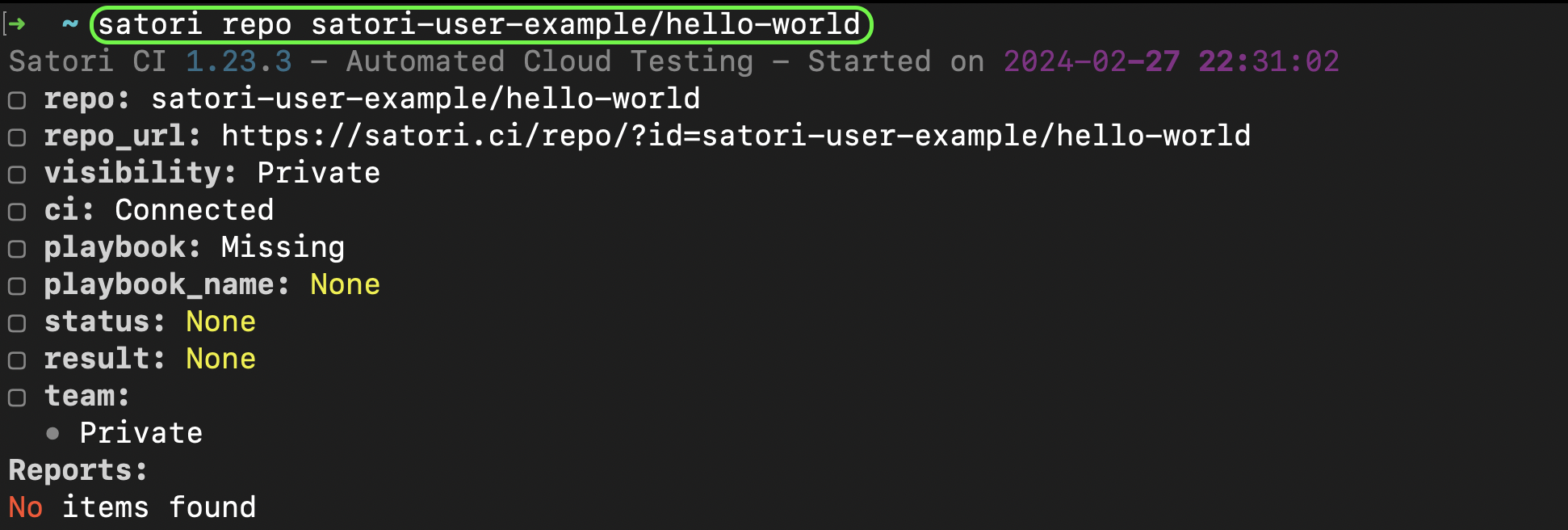
Run
Running a Playbook on a Repository
To run the .satori.yml playbook on the latest commit of your repository, use:
satori-v2 repo githubUsername/repository run
Private Playbook
If you'd like to run a different playbook instead of .satori.yml, specify it using the --playbook parameter:
satori-v2 repo githubUsername/repository run --playbook playbook.yml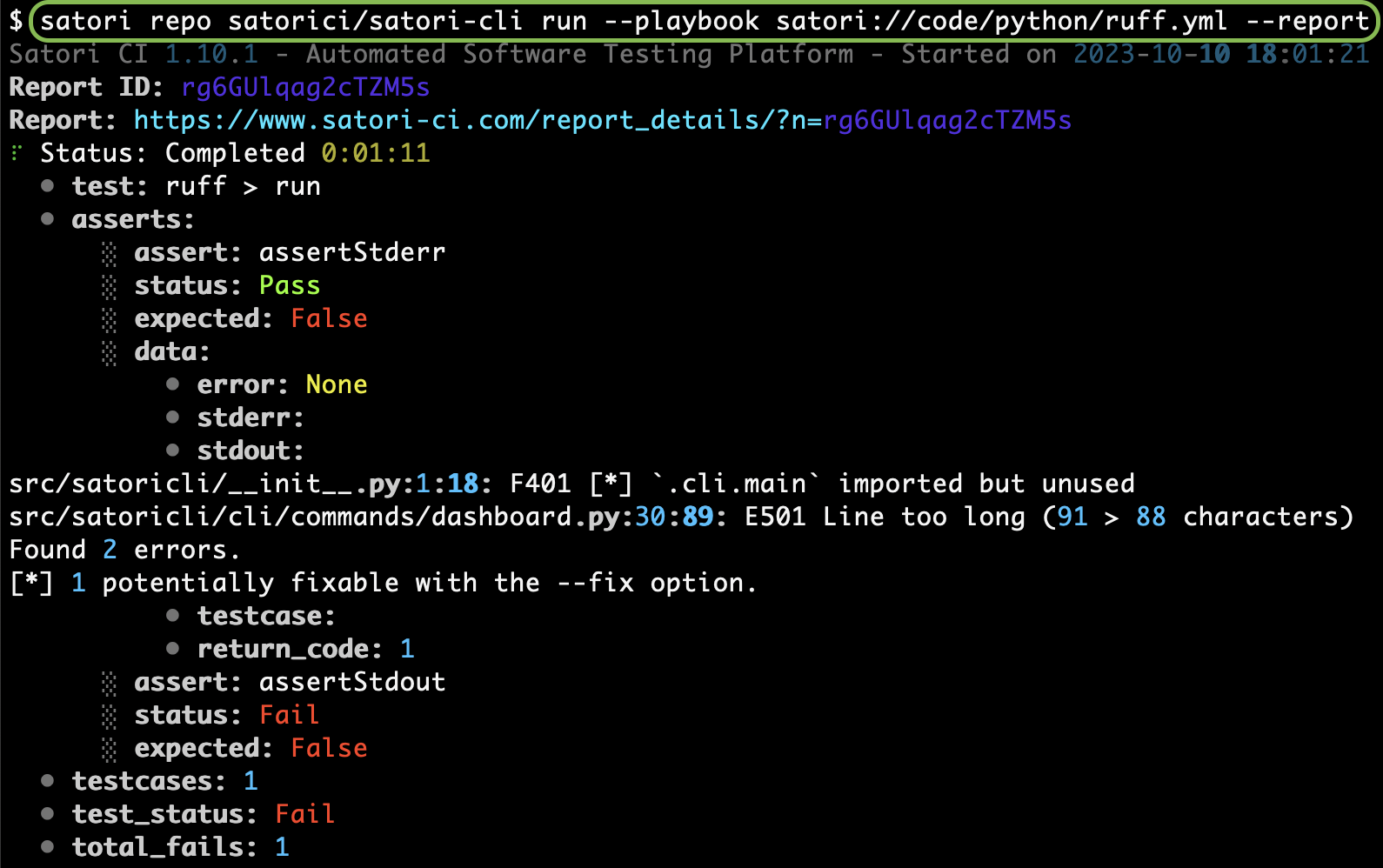 |
|---|
| Report from running the python lint analyzer ruff on the repo satorici/satori-cli |
Public Playbook
Public playbooks provided by Satori can be listed with the command:
satori-v2 playbooks --publicThese are hosted on GitHub at GitHub. You can run any public playbook using the satori:// shortcut.
For example, run the public playbook satori://code/python/ruff.yml .
satori-v2 repo githubUsername/repository run --playbook satori://code/python/ruff.yml --report --output
Run on Multiple Repositories
Trufflehog is a tool that helps to detect sensitive information, such as API keys or secrets, stored within your codebase. You can automate the process of scanning all repositories within a specific account by running the Trufflehog playbook.
To run the Trufflehog playbook on all repositories under a specific GitHub account, use the following command:
satori-v2 repo "githubUsername/*" run --playbook satori://code/trufflehog.ymlThis command will scan every repository under the provided githubUsername using the trufflehog.yml playbook, helping you ensure your repositories remain secure.
In CLI v2 the same scan is:
satori-v2 run satori://code/trufflehog.yml --repo githubUsernameIt scans the latest commit of up to 100 repositories in one job; see Scan GitHub Account Repositories.

Analyze Commit
You can run a playbook on a specific commit within any branch of your repository. This allows you to analyze how a particular commit affects your codebase by running the configured playbook on that specific commit.
To run a repository's playbook on a particular commit, use the following command:
satori-v2 repo https://github.com/satorici/satori-cli/commit/96a654f9efb8962b20a514eccbe827518ca725b2 run
Managing parameters for a repository
When your playbook requires sensitive data (e.g., API keys, tokens) that should not be hardcoded directly into the playbook, you can securely define and manage these values through the params subcommand.
Adding a Parameter
To add a new parameter, use the params add command with the format:
satori-v2 repo <repository> params add '<PARAM_NAME>=<VALUE>'Example:
satori-v2 repo satorici/satori-cli params add 'TOKEN=Test123'
This will add a new parameter called TOKEN with the value Test123.
Listing Parameters
To list all parameters associated with a repository, use the params command:
satori-v2 repo <repository> paramsExample:
satori-v2 repo satorici/satori-cli params
This command displays all stored parameters along with their creation details.
Deleting a Parameter
If you need to delete an existing parameter, use the params del command:
satori-v2 repo <repository> params del <PARAM_NAME>Example:
satori-v2 repo satorici/satori-cli params del TOKEN
This removes the parameter TOKEN from the list.
Advanced Repository Command Options
The satori-v2 repo command provides extensive options for running playbooks and managing test results.
Running with Options
| Flag | Description | Example |
|---|---|---|
-b, --branch BRANCH | Run on specific branch (default: main) | satori-v2 repo user/repo run -b develop |
-d, --data JSON | Provide secrets/parameters as JSON | satori-v2 repo user/repo run -d '{"KEY":"value"}' |
--playbook URI | Override repository's default playbook | satori-v2 repo user/repo run --playbook satori://code/semgrep.yml |
-s, --sync | Wait for run to complete | satori-v2 repo user/repo run --sync |
-o, --output | Display command output | satori-v2 repo user/repo run --sync --output |
-r, --report | Display test results | satori-v2 repo user/repo run --sync --report |
--visibility {public|private|unlisted} | Set run visibility | satori-v2 repo user/repo run --visibility public |
Test Results Management
| Flag | Description | Example |
|---|---|---|
-a, --all | Show all test results | satori-v2 repo user/repo tests --all |
-l, --limit NUMBER | Limit number of results (default: 100) | satori-v2 repo user/repo tests -l 50 |
--fail | Show only failed tests | satori-v2 repo user/repo tests --fail |
Repository Information
| Flag | Description | Example |
|---|---|---|
--pending | Show pending actions in repository info | satori-v2 repo user/repo --pending |
Playbook Management
| Command | Description | Example |
|---|---|---|
playbook list | List playbooks associated with repository | satori-v2 repo user/repo playbook list |
playbook add URI | Add playbook to repository | satori-v2 repo user/repo playbook add satori://code/semgrep.yml |
playbook del URI | Remove playbook from repository | satori-v2 repo user/repo playbook del satori://code/semgrep.yml |
playbook clean --delete-commits | Delete playbook data and commit records | satori-v2 repo user/repo playbook clean --delete-commits |
Complete Example
Run a playbook on a specific branch with parameters and view the output:
satori-v2 repo satorici/satori-cli run \
  -b develop \
  -d '{"API_KEY":"secret","TIMEOUT":"300"}' \
  --playbook satori://code/trufflehog.yml \
  --sync \
  --report \
  --output \
  --visibility private
This command:
- Runs on the
developbranch - Provides two secret parameters
- Uses the Trufflehog playbook
- Waits for completion
- Displays both report and output
- Sets visibility to private
Filter Failed Tests
To quickly identify issues, filter for failed tests only:
satori-v2 repo user/repo tests --fail -l 20This shows the 20 most recent failed tests for the repository.