
Scan
You can run a playbook on all the repositories of a GitHub account or on all the commits of a repository
Whenever you want to run an execution on each of the individual commits of a repository, you can use the scan functionality.
Create a Scan
A scan needs a repository. The playbook is optional: without one, the scan uses the root .satori.yml of the repository. To use another playbook, give it as the second positional argument or with -p/--playbook:
satori-v2 scan githubUsername/repository
satori-v2 scan githubUsername/repository satori://code/semgrep.yml
satori-v2 scan githubUsername/repository --playbook satori://code/semgrep.yml
satori-v2 scan githubUsername/repository .satori.yml
The SOURCE can be a public satori:// playbook or a local .yml file. Directories are not accepted as scan sources (use satori-v2 run ./ --repo owner/repo to run a local directory playbook against a repository instead).
Scan GitHub Account Repositories
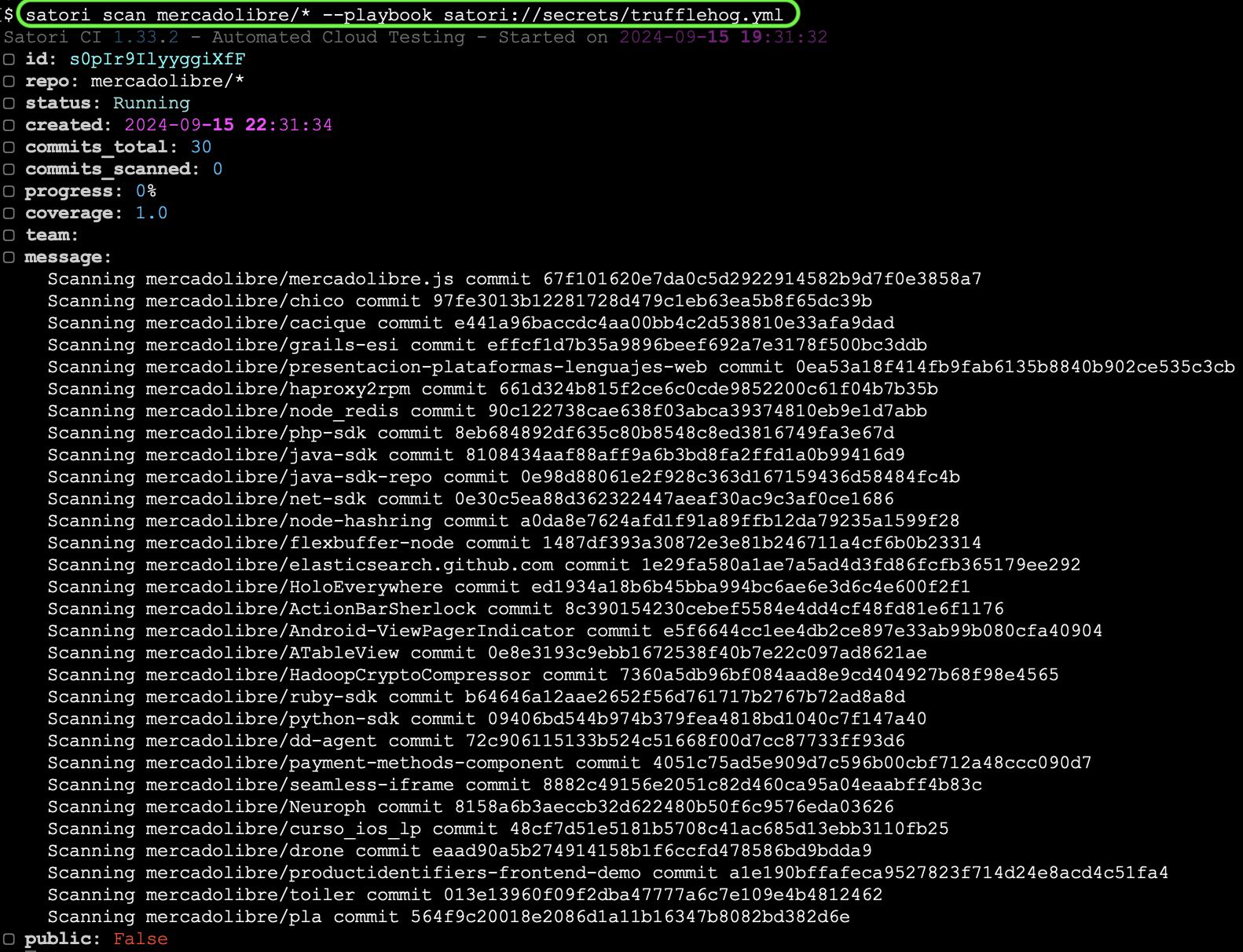
Use an owner/* target (or just owner) to scan every repository of a GitHub user or organization in a single scan job, with one execution per repository:
satori-v2 scan "githubUsername/*"
satori-v2 scan "githubUsername/*" --playbook satori://code/trufflehog.yml
satori-v2 run --repo githubUsername
Quote owner/* so your shell does not expand the *. With satori-v2 run, wildcards are only accepted through --repo. A positional satori-v2 run owner or satori-v2 run "owner/*" is rejected, so a mistyped folder name never scans someone's GitHub account.
- HEAD only: each repository's latest commit on its default branch is scanned.
-qgreater than 1 is rejected. - Playbook per repository: without a playbook, each repository runs its own root
.satori.yml(or.satori.yaml). With a playbook (SOURCEor-p), every repository runs that one. - Which repositories: public repositories of the owner, plus the private ones covered by your GitHub App installation. Forks and archived repositories are left out.
- Limit: at most 100 repositories, the most recently pushed first. The scan reports how many were left out.
- Skipped repositories: a repository is skipped with a warning, not failed, when it can't be read, is empty, has no root
.satori.yml, or its playbook is invalid.satori-v2 scan IDlists the skipped repositories and why.
The repositories are resolved in the background right after the scan is created (status FETCHING_DATA), so the executions show up once the scan is RUNNING. Each report records which repository it scanned.
satori-v2 local does not support wildcards.
Example:
Scan GitHub Repository Commits
If you target a repo, the optional parameter -q/--quantity indicates how many of the repository commits (starting from the latest) to include in the scan. For example -q 1 scans only the latest commit, which is exactly what satori-v2 run PLAYBOOK --repo owner/repo does. This is useful for sampling large repositories:
satori-v2 scan githubUsername/repository satori://code/semgrep.yml -q 10
Example:
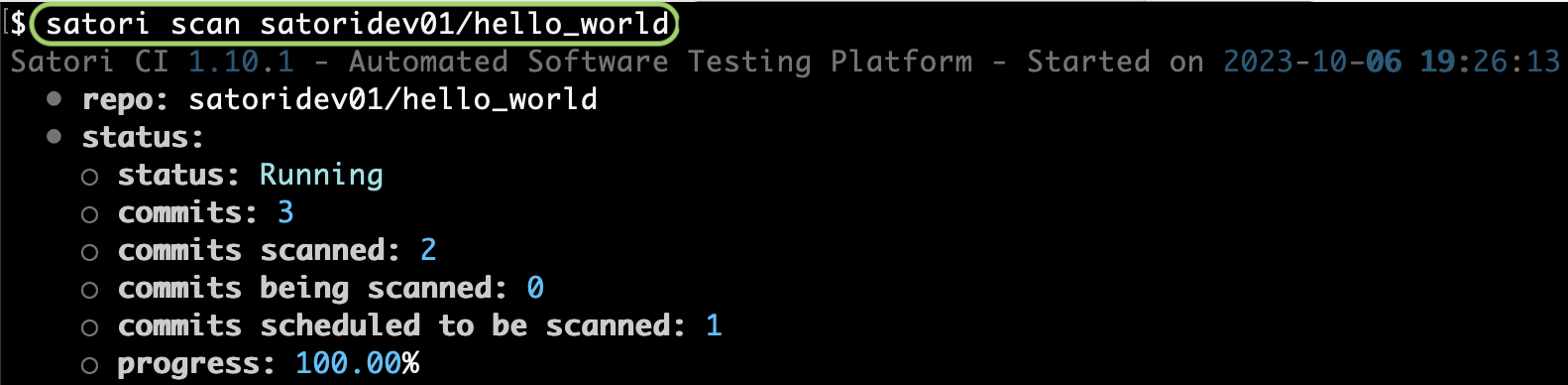
If you omit -q, the scan covers the repository commits without limit.
On development
The v1 -c PERCENTAGE flag (percentage of commits to scan) has been replaced by -q/--quantity N (number of commits) in CLI v2. The v1 syntax is kept here for reference.
satori-v2 scan githubUsername/repository -c 100
You can see how the results of your playbook affect different commits and forks of your repository.
Scan Information
The CLI treats the first argument as a scan ID only when it is 21 letters and digits. Anything else creates a scan. If a GitHub owner's name happens to have that form, write owner/* to scan its repositories.
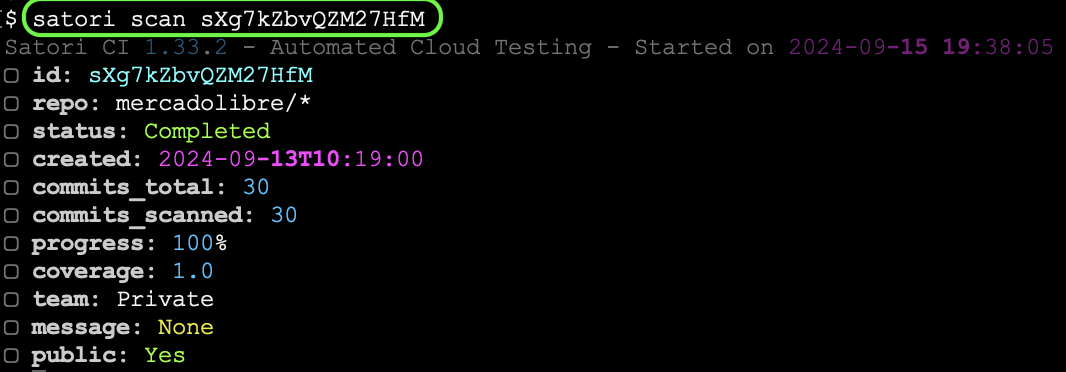
If need to get the status of a scan, you can reference its id with:
satori-v2 scan IDAdd --json to get the information as JSON. To list all your scans use satori-v2 scans (supports --json, --page, -q/--quantity and --public).
Example:
Scan Status
Since normally repositories have a lot of commits, you may want to check what the execution status is with this command:
satori-v2 scan ScanID statusAdd --json to print the raw status response.
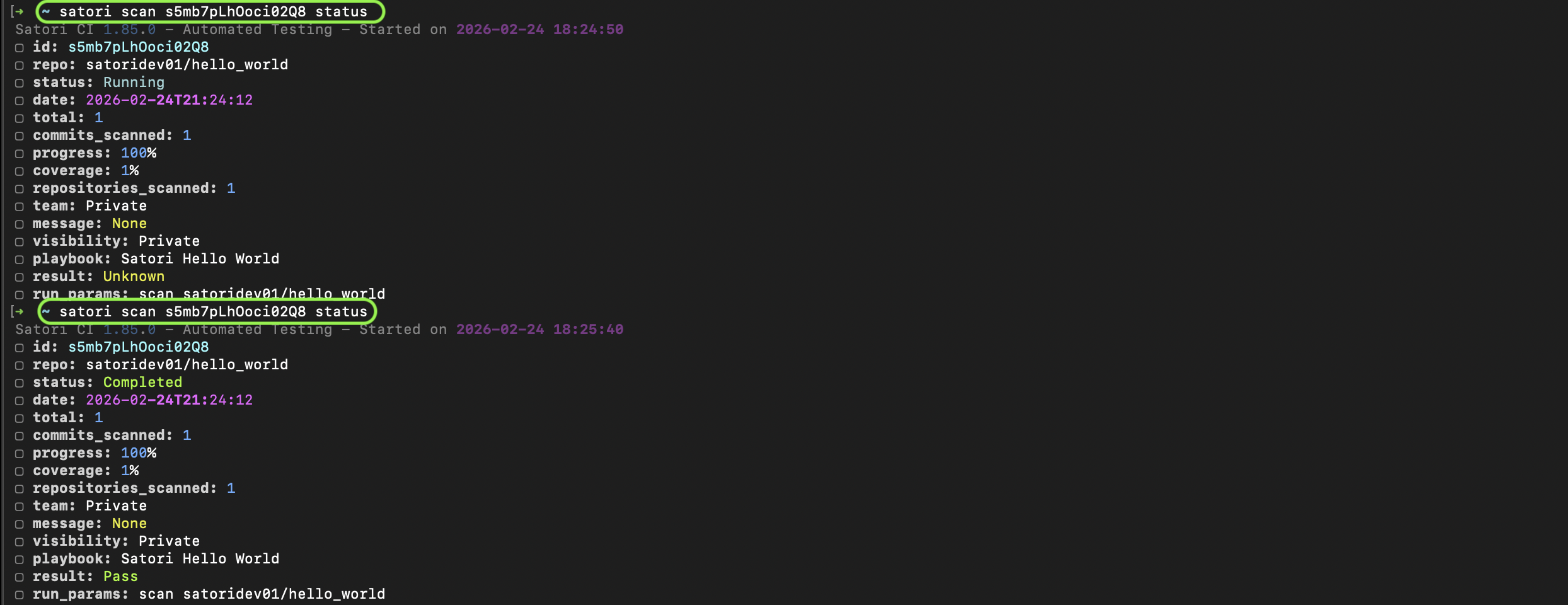
It shows the current status, the amount of commits found, which ones were scanned, which ones are being scanned and which ones are scheduled to be scanned. Since no scan is being run at the time of executing this command, there is no progress but in other cases it would be a percentage.
Scan Stop
If at any point you want to cancel the scan, you use the stop action:
satori-v2 scan ScanID stopStopping a scan also cancels its executions that are still running. The reports of the executions that already finished are kept.
Example:

Scan Reports
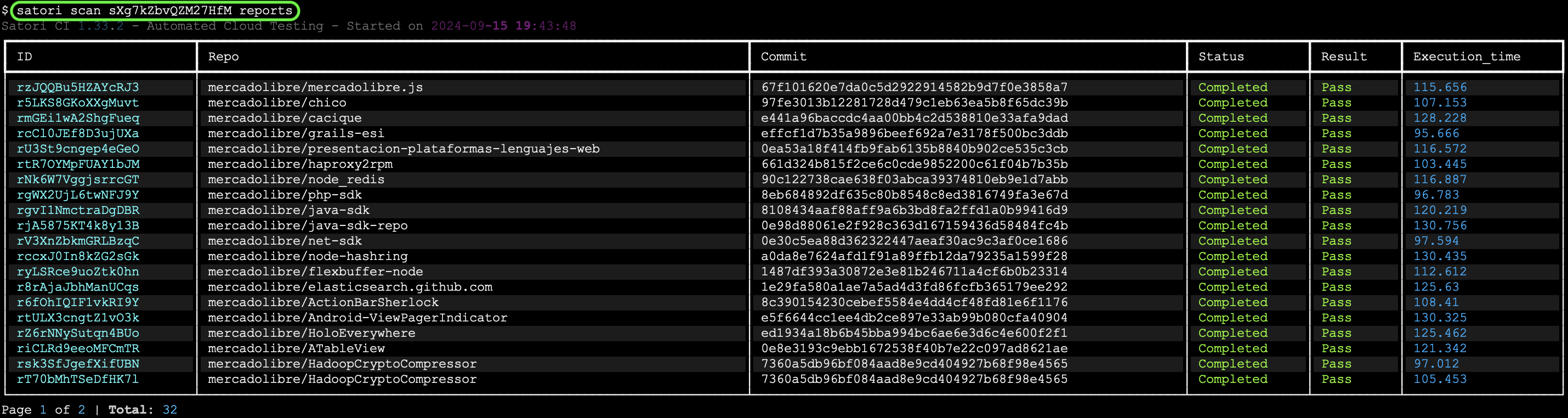
The reports (executions) of a scan can be listed with the generic reports command, passing the scan ID:
satori-v2 reports ScanIDOn development
satori-v2 scan ID reports (with its -p/-l pagination flags) is not available yet in CLI v2; use satori-v2 reports ScanID shown above. The v1 syntax is kept here for reference.
satori-v2 scan ID reportsExample:
Scan Clean
WARNING
This command will delete all the reports associated to a scan:
satori-v2 scan ScanID cleanExample:

On development
In CLI v2 clean takes the scan ID rather than the user/repository name, and the --delete-commits flag is not available yet. The v1 syntax is kept here for reference.
satori-v2 scan githubUsername/repository clean
satori-v2 scan githubUsername/repository clean --delete-commits
Scan Delete
To delete a scan once it is finished or stopped:
satori-v2 scan ScanID deleteAdvanced Scan Options
The satori-v2 scan command provides extensive options for controlling scanning behavior and filtering results.
Data and Configuration
| Flag | Description | Example |
|---|---|---|
-p, --playbook SOURCE | Playbook to run on each commit (alternative to the positional SOURCE) | satori-v2 scan user/repo --playbook satori://code/semgrep.yml |
-q, --quantity NUMBER | Number of commits to scan, starting from the latest | satori-v2 scan user/repo semgrep.yml -q 20 |
-d, --data KEY=VALUE | Define parameters and their values (repeatable) | satori-v2 scan user/repo semgrep.yml -d API_KEY=secret |
--split KEY=DELIMITER | Split the value of parameter KEY on DELIMITER into several input values | satori-v2 scan user/repo pb.yml -d HOSTS=a,b --split HOSTS=, |
-df, --data-file KEY=PATH | Load variable values from a file (repeatable). Each non-blank line becomes a value for KEY | satori-v2 scan user/repo pb.yml -df PAYLOAD=/path/to/data.txt |
-e, --env KEY VALUE | Set an environment variable in the execution container (repeatable) | satori-v2 scan user/repo pb.yml -e DEBUG 1 |
Execution Environment
| Flag | Description | Example |
|---|---|---|
--cpu COUNT | CPU units for the container | satori-v2 scan user/repo pb.yml --cpu 2048 |
--memory MB | Memory for the container in MB | satori-v2 scan user/repo pb.yml --memory 4096 |
--image IMAGE | Custom Docker image | satori-v2 scan user/repo pb.yml --image python:3.12 |
-r, --region-filter REGION | Restrict executions to the given region(s) (repeatable) | satori-v2 scan user/repo pb.yml -r us-east-1 |
CLI flags take precedence over the cpu, memory and image values of the playbook settings. --cpu and --memory need a PRO or ENTERPRISE plan; --image works on any plan. On the COMMUNITY plan the flags are rejected, and the cpu, memory and storage of the playbook settings are ignored, so the playbook still runs with the default resources.
Execution Control
| Flag | Description | Example |
|---|---|---|
-s, --sync | Wait for scan to complete | satori-v2 scan user/repo pb.yml -s |
--visibility {public|private|unlisted} | Set scan visibility (default: private) | satori-v2 scan user/repo pb.yml --visibility public |
--json | Print the scan job as JSON | satori-v2 scan user/repo pb.yml --json |
On development
The following v1 options and subcommands are not available yet in CLI v2. The v1 syntax is kept here for reference.
Branch and Date Filtering
| Flag | Description | Example |
|---|---|---|
-b, --branch BRANCH | Scan specific branch (default: main) (on development) | satori-v2 scan user/repo -b develop |
--from YYYY-MM-DD | Start date for scanning commits (on development) | satori-v2 scan user/repo --from 2024-01-01 |
--to YYYY-MM-DD | End date for scanning commits (on development) | satori-v2 scan user/repo --to 2024-12-31 |
Output and Checks
| Flag | Description | Example |
|---|---|---|
-c PERCENTAGE | Percentage of commits to scan (replaced by -q/--quantity) | satori-v2 scan user/repo -c 100 |
-o, --output | Display command output (on development) | satori-v2 scan user/repo -s --output |
-r, --report | Display test results (on development; in v2 -r is --region-filter) | satori-v2 scan user/repo -s --report |
--skip-check | Skip repository existence check (on development) | satori-v2 scan user/repo --skip-check |
Subcommands
| Command | Description | Example |
|---|---|---|
scan ID reports [-p N] [-l N] | List the reports of a scan (on development, use satori-v2 reports ID) | satori-v2 scan ID reports -l 50 |
scan ID clean --delete-commits | Delete commit records during cleanup (on development) | satori-v2 scan ID clean --delete-commits |
scan ID visibility VALUE | Change the visibility of a scan (on development) | satori-v2 scan ID visibility public |
scan ID check-commits | Refresh the list of commits of the repository (on development) | satori-v2 scan ID check-commits |
scan ID check-forks | Refresh the list of forks of the repository (on development) | satori-v2 scan ID check-forks |
Complete Scan Example
satori-v2 scan user/repo satori://code/semgrep.yml \
  -q 50 \
  -d API_KEY=my-secret-key \
  -e SEMGREP_TIMEOUT 300 \
  --cpu 2048 \
  --memory 4096 \
  -r us-east-1 \
  --sync \
  --visibility private
This command:
- Scans the latest 50 commits of the repository
- Provides an API key as a parameter and an environment variable to the container
- Uses the Semgrep playbook with 2 vCPU and 4GB memory in
us-east-1 - Waits for completion
- Sets visibility to private
The v1 example is kept below for reference; -c, -b, --from, --to and --report are on development in CLI v2:
satori-v2 scan user/repo \
  -c 50 \
  -b develop \
  --from 2024-01-01 \
  --to 2024-12-31 \
  -d '{"API_KEY":"my-secret-key"}' \
  --playbook satori://code/semgrep.yml \
  --sync \
  --report \
  --visibility private